

Image Source: unsplash
Have you ever wondered if a relay in your circuit is working properly? Knowing how to test a relay with a 12v battery can save you time and effort. It's a quick and easy way to check if the relay is functioning as it should. You'll only need a few basic tools and a bit of patience. Whether you're troubleshooting a car's electrical system or a home project, this method works like a charm. Let's dive in and get that relay tested!
Key Takeaways
- Gather tools like a 12V battery, multimeter, and jumper wires. These tools help you test the relay safely and easily.
-
-
Use a multimeter to check the relay's coil resistance. A good relay should have resistance between 288 and 352 ohms. If it's not in this range, the relay might be broken.
-
-
Connect the battery to the relay and listen for a click. The click means the relay is working. If there's no click, check your connections again.
-
-
After hearing the click, test the relay's contacts for continuity. Use a multimeter to see if the relay transfers power correctly. If there's no continuity, the relay is likely damaged.
-
-
Replace any relay with damage, like burn marks or bad results. A broken relay can cause bigger electrical problems later.
Tools and Equipment Needed
Get your tools ready before testing the relay. Having everything prepared makes it easier and safer. Here's what you'll need:
12V Battery
The 12V battery is the main power source for this test. It sends energy to activate the relay coil. You can use a car battery or a smaller battery pack. Make sure it's fully charged for accurate testing.
Tip: Be careful with car batteries. They are heavy and can give off strong currents. Don't let the terminals touch each other.
Multimeter
A multimeter helps check electrical parts like the relay. Use it to measure resistance in the coil and check relay contacts. If you don't own one, you can buy it at a store or online.
-
How to use it:
-
Switch the multimeter to resistance or continuity mode. Place the probes on the relay pins as explained later in this guide.
Jumper Wires
Jumper wires connect the battery to the relay. They are flexible and simple to use for temporary setups. Pick wires with insulation to avoid shocks or short circuits.
Note: Wires with alligator clips are better for secure connections. They stop you from struggling with loose ends during testing.
🔧 Checklist:
-
12V battery
-
Multimeter
-
Jumper wires
Once you have these tools, you're ready to test the relay. Let's begin!
Alligator clips
Alligator clips are small clamps that help connect wires easily. They look like tiny jaws and hold onto terminals tightly. These clips are very useful for keeping connections steady without holding wires by hand.
Why use alligator clips?
-
They make quick and easy temporary connections.
-
-
They stop wires from slipping off during testing.
-
They free your hands to focus on other tasks.
-
Tip: Pick clips with insulated covers. This helps avoid shocks or short circuits while working.
How to use them:
-
Clip one end to the positive terminal of the 12V battery.
-
-
Attach the other end to a relay pin (like pin 85 or 86).
-
-
Do the same for the negative terminal and its matching relay pin.
-
Ensure the clips are attached tightly. Loose clips can cause wrong results or sparks. If testing more than one relay, label the clips to stay organized.
Alligator clips are cheap and easy to find. You can buy them online or at hardware stores. They're a small tool that makes testing much simpler.
Insulated gloves (optional for safety)
Insulated gloves aren't always needed, but they add safety. These gloves protect your hands from electrical shocks. They are especially helpful when working with car batteries, which have strong currents.
Benefits of wearing insulated gloves:
-
They keep your hands safe from shocks.
-
-
They lower the chance of burns from hot wires.
-
-
They make you feel safer when handling electrical parts.
-
Note: If your setup is safe and uses low currents, gloves may not be needed. But safety should always come first.
Choose gloves made of rubber or other non-conductive materials. Make sure they fit well so you can handle small tools like wires and clips. If you don't have gloves, avoid touching bare wires or terminals.
Using insulated gloves adds extra safety to your testing. It's a simple step that helps prevent accidents and keeps you protected.
Safety Precautions
Staying safe is important when working with electrical parts like relays. A few easy steps can help you avoid accidents and test smoothly. Let's look at how to stay safe.
Don't touch battery terminals directly
Touching a 12V battery's terminals with bare hands is dangerous. Batteries hold a lot of power, and touching them can cause shocks or burns.
-
Use tools with insulation to handle the battery.
-
-
Take off metal jewelry like rings or bracelets before starting.
-
-
Make sure your hands are dry before touching anything electrical.
-
⚠️ Reminder: Electricity can hurt you! Always be careful when working with it.
Choose a dry and airy workspace
Where you work matters for safety. Wet or stuffy places can make accidents more likely.
-
Set up your tools in a clean, dry area.
-
-
Keep flammable items like gas or liquids far away. Sparks can start fires.
-
-
If testing on a car, check the car's safety guide for tips.
-
Tip: Bright lighting helps you see better and avoid mistakes.
Disconnect the relay from power
Before testing, make sure the relay isn't connected to power. This keeps you and the relay safe from damage.
-
Remove the relay from its original setup.
-
-
Use a multimeter to check for leftover current.
-
-
Handle the relay gently to avoid bending its pins.
-
🔌 Pro Tip: If unsure, follow a trusted repair guide to disconnect parts safely.
By following these steps, you'll have a safe and organized workspace. Taking time to prepare is always better than dealing with accidents. Stay careful and test with ease!
Use insulated tools to avoid short circuits
Short circuits can mess up your test and harm the relay. Insulated tools help stop this from happening. These tools have special coatings that block electricity from going the wrong way.
Why insulated tools are important
Exposed metal can cause sparks or heat when testing electrical parts. This might damage the relay or your setup. Insulated tools protect you and keep your equipment safe.
⚡ Tip: Pick tools marked "electrically insulated" or "non-conductive." They are made for electrical tasks.
Tools to use for safety
Here's a list of insulated tools to make testing safer:
-
Screwdrivers: Rubber handles keep electricity away.
-
-
Pliers: Insulated grips hold wires safely.
-
-
Wire cutters: Coated cutters stop contact with live wires.
-
-
Multimeter probes: Insulated probes prevent shocks during testing.
-
How to use insulated tools properly
-
Check tools for cracks or worn insulation before using them.
-
-
Hold tools only by their insulated parts. Don't touch exposed metal.
-
-
Keep tools away from battery terminals when not in use.
-
⚠️ Reminder: Don't use damaged tools. Even small tears in insulation can be risky.
Insulated tools make testing safer and easier. They let you focus on the relay without worrying about accidents. Use the right tools and test with peace of mind!
How to test a relay with a 12v battery

Image Source: pexels
Identify the relay pins (85, 86, 30, 87, 87a)
Before you start testing, you need to figure out what each pin on the relay does. Most relays have numbers printed near the pins, like 85, 86, 30, 87, and sometimes 87a. These numbers aren't random-they tell you exactly how the relay works. Here's a quick breakdown:
-
Pin 85: This pin gets power from the switch.
-
-
Pin 86: It connects to the ground, completing the circuit to activate the relay's electromagnet.
-
-
Pin 30: This is the output pin that sends current to the component when the relay is energized.
-
-
Pin 87: It receives high-amperage current directly from the battery.
-
-
Pin 87a: This pin is usually an alternative output when the relay isn't energized.
-
If you're unsure about the pin layout, check the relay's diagram. Most relays have a small schematic printed on the side. This diagram shows how the pins are connected internally. Take a moment to study it-it'll save you time and prevent mistakes later.
Tip: If the numbers are hard to read, use a flashlight or magnifying glass to make them clearer.
Test the relay coil with a multimeter
Now that you've identified the pins, it's time to check if the relay coil is in good shape. The coil is what creates the magnetic field to switch the relay on and off. A multimeter is your best friend for this step.
-
Set your multimeter to the resistance (ohms) setting.
-
-
Place the multimeter probes on pins 85 and 86. These are the coil pins.
-
-
Look at the reading on the multimeter. A healthy relay coil should have a resistance between 288 and 352 ohms.
-
If the resistance is lower than 288 ohms, the coil might be shorted. If it's higher than 352 ohms, the coil could be damaged or broken. Either way, the relay won't work properly.
Note: If your multimeter shows "OL" (open loop), the coil is likely broken, and the relay needs to be replaced.
Testing the coil only takes a minute, but it's a crucial step. It tells you right away if the relay is worth testing further or if it's time to toss it out.
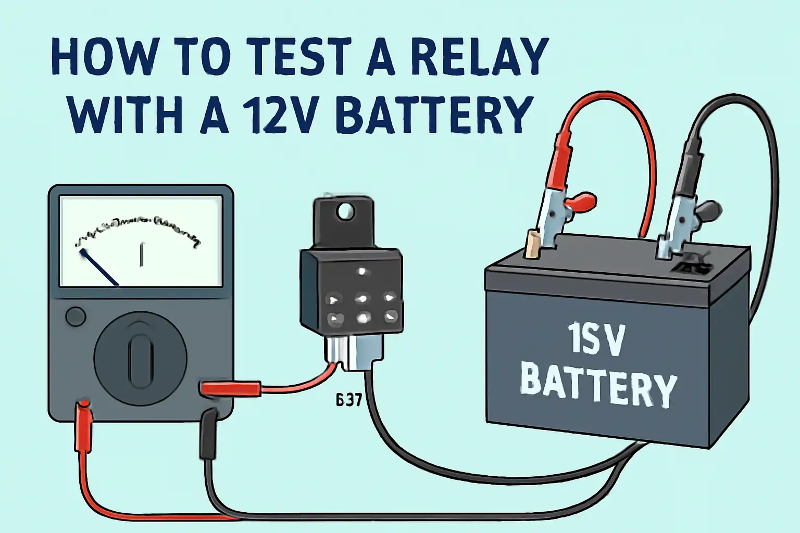
Connect the 12V battery to the relay coil (pins 85 and 86)

Once you've confirmed the coil is in good condition, you can move on to the fun part-powering up the relay! This step lets you see if the relay clicks and switches as it should.
-
Grab your 12V battery and some jumper wires or alligator clips.
-
-
Connect one wire to the positive terminal of the battery and attach the other end to pin 85.
-
-
Take another wire and connect it to the negative terminal of the battery. Attach the other end to pin 86.
-
When you complete the connection, listen closely. You should hear a distinct click sound. This click means the relay's electromagnet is working, and it's switching the internal contacts.
Pro Tip: If you don't hear a click, double-check your connections. Make sure the battery is charged and the wires are securely attached.
Hearing the click is a good sign, but it's not the whole story. In the next steps, you'll test the relay's contacts to ensure they're working properly.
Listen for the clicking sound
Once you've connected the 12V battery to the relay coil, listen carefully for a clicking sound. This click is the relay's way of telling you it's working. It happens because the coil creates a magnetic field, pulling the internal switch into position.
If you hear the click, that's great news! It means the relay's coil is functioning, and the electromagnet is doing its job. But if there's no sound, don't panic. Double-check your connections. Make sure the battery is charged and the wires are securely attached to pins 85 and 86.
Tip: If you're testing multiple relays, label each one to avoid confusion. This helps you keep track of which relay clicks and which doesn't.
No click? The relay might be faulty. You can still move on to the next step to confirm whether the internal contacts are working.
Test the relay contacts for continuity (pins 30 and 87)
Now it's time to check the relay's internal contacts. These contacts are responsible for transferring power when the relay is activated. You'll use your multimeter for this step.
-
Set your multimeter to continuity mode.
-
-
Place one probe on pin 30 and the other on pin 87.
-
-
Activate the relay by connecting the battery to pins 85 and 86 again.
-
When the relay clicks, the multimeter should beep or show a reading indicating continuity. This means the internal switch has closed, allowing current to flow between pins 30 and 87.
If there's no continuity, the relay's contacts might be damaged or stuck. You can try gently tapping the relay to loosen any debris inside, but if that doesn't work, it's time to replace the relay.
Pro Tip: Some relays also have pin 87a, which is used when the relay isn't energized. You can test this pin the same way by checking continuity between pins 30 and 87a when the relay is off.
Repeat the process to confirm results
Testing a relay once is good, but testing it twice is better. Repeating the process ensures your results are accurate and consistent.
-
Disconnect the battery and multimeter.
-
-
Reconnect everything and test the relay again.
-
-
Listen for the click and check continuity between pins 30 and 87.
-
If the relay passes both tests consistently, it's in good working condition. If the results vary, the relay might be unreliable and should be replaced.
Reminder: Always test in a safe, dry workspace. Double-check your tools and connections before starting each test.
By repeating the process, you can confidently determine whether the relay is functional or faulty. This step is especially important if you're troubleshooting a critical system, like a car's electrical setup.
Interpreting Results
What a clicking sound means
When you hear a click after connecting the 12V battery to the relay coil, it's a good sign. This sound shows the relay's electromagnet is working. The click happens because the magnetic field moves the internal switch into place. It confirms the relay is switching correctly.
If there's no click, the coil might be damaged, or the relay isn't getting power. Check your connections and make sure the battery is fully charged. Loose wires or a weak battery can stop the relay from clicking. If everything looks fine but there's still no sound, the relay could be broken.
Tip: Test in a quiet area. Noise can make it hard to hear the click.
Checking relay contacts for continuity
After hearing the click, test the relay's internal contacts. This step checks if the relay transfers power properly. Use a digital multimeter (DMM) set to continuity mode.
-
Put one probe on pin 30 and the other on pin 87.
-
-
Power the relay by connecting the battery to pins 85 and 86.
-
-
When the relay clicks, the multimeter should beep or show a reading for continuity.
-
-
For Normally Closed (NC) contacts, expect no continuity when the relay is powered.
-
If the multimeter doesn't show continuity for Normally Open (NO) contacts, the relay's internal switch might be stuck or broken. This means the relay won't work in a circuit.
Pro Tip: Test the relay a few times. A good relay gives the same results every time.
Signs of a bad relay
A bad relay can cause problems in your electrical system. Look for these signs:
-
No clicking sound: This could mean a damaged coil or bad connections.
-
-
No continuity: If the multimeter doesn't show continuity, the internal contacts may be broken.
-
-
Unreliable results: A relay that works sometimes but fails other times isn't dependable.
-
-
Burn marks or rust: Damage on the relay's pins or case means it needs replacing.
-
If you see any of these issues, replace the relay. Testing it again won't fix the problem. Using a bad relay can cause bigger problems in your system.
Reminder: Handle relays gently. Dropping them can cause hidden damage, even if they look fine.
When to replace the relay
Sometimes, a relay can't be fixed and needs replacing. Knowing when to do this can prevent bigger problems later. Here are signs that it's time for a new relay:
-
No clicking sound during testing: If the relay doesn't click after connecting the 12V battery, the coil might be broken. A broken coil means the relay won't work in any setup.
-
-
Burn marks or discoloration: Look at the relay's case and pins. Burn marks, melted parts, or rust show damage. These problems make the relay unsafe to use.
-
-
Inconsistent results: Does the relay pass some tests but fail others? This means it's unreliable. A relay that works sometimes can cause random issues in your system.
-
-
No continuity in the contacts: If the multimeter doesn't show continuity when the relay clicks, the internal switch is likely broken. Without this, the relay can't send power.
-
⚠️ Important: Don't try fixing a bad relay. Replacing it is safer and works better.
When buying a new relay, make sure it matches the old one. Check these details:
|
Specification |
What to Check |
|---|---|
|
Voltage Rating |
Same as your system (e.g., 12V) |
|
Pin Configuration |
Matches the old relay layout |
|
Current Capacity |
Handles the needed amperage |
Take the old relay with you when shopping. This helps you find the right match.
Replacing a bad relay is easy and cheap. It keeps your system working well and avoids future issues. If your relay shows these signs, don't wait-replace it!
Testing a relay with a 12V battery is fast and easy. It helps you check if the relay works without wasting time or money on replacements.
Here's why this method is great:
-
It's easy and needs only basic tools.
-
-
You can clearly tell if the relay is good or bad.
-
Safety Tip: Always check your connections twice. Wear insulated gloves for extra safety. Protecting yourself is as important as accurate testing!
With this guide, you can test relays confidently. Try it out and see how simple it is!
FAQ
What happens if I connect the relay pins incorrectly?
If you connect the pins wrong, the relay won't work. You might also damage the relay or your battery. Double-check the pin numbers and use the relay diagram to avoid mistakes.
Can I test a relay without a multimeter?
Yes, but it's harder. You can still check for the clicking sound by connecting the battery to pins 85 and 86. However, you won't know if the internal contacts are working without a multimeter.
How do I know if my relay is compatible with a 12V battery?
Look at the relay's voltage rating. It's usually printed on the case. If it says 12V, it's compatible. Using a relay with a different voltage rating can cause it to fail or overheat.
Is it safe to test a relay indoors?
Testing indoors is fine if the area is dry and well-ventilated. Keep flammable items away and use insulated tools. If you're working with a car battery, be extra cautious to avoid sparks.
Can I reuse a relay that clicks but fails the continuity test?
No, you shouldn't reuse it. A relay that fails the continuity test won't transfer power properly. Replace it to avoid issues in your electrical system.